Subscribe For Free Updates!

We'll not spam mate! We promise.

Thursday, 17 April 2014

How to reduce ping when playing online games

how-to-decrease-online-game-ping
High ping is a major problem for online gamers. You will suffer lag and delay depending on the game which you are playing. I played lots of online games and it really is a very big disadvantage when you play on a high ping. You experience high ping because of many factors. It may be because of  a virus on your computer, a network setting or your ISP throttling your internet speed, etc..

I'll give here all the steps that I know to hopefully make your online gaming a better experience:

  1. Check your computer for viruses and spywares - If you don't have any antivirus installed on your computer, It's best to install one now and scan your computer for malwares. There are many FREE antivirus scattered around the internet like Avira, for example.
  2. Close all downloads when playing online - Close or pause them when gaming as they are the main reason you're having high ping. They hog your bandwidth.
  3. Close processes that may be using the internet - Close your browser and all other apps that are using your internet so your game will be the only one which uses it. You can also use Razer Game booster to close them for you.
  4. Disable your antivirus when gaming - Other gamers suggest to disable it when gaming as it scans packets before it arrives to its destination. Don't forget to enable it after you play.
  5. Install Leatrix Latency Fix - It has various tweaks for TCP parameters. Use it so TCP acknowledgements sent to the game server will be faster. You can download Leatrix Latency fix here.
  6. If the above tips doesn't work - Contact yout ISP and tell them about your problems in gaming. If you are on wireless, change your network plan and switch to a wired one as wireless internet are not very good in online games because you might get lots of packet loss.
That's about all of it. If I find more tweaks or softwares, I will share it here to make everyone's ping low.



Monday, 14 April 2014

Dota 6.80c Map Download

dota logo warcraft 3 villehem

It's been a while since I played Warcraft DotA and I visited the official website to see that they have updated their map to 6.80c. Last time I played it was 6.79 but since I'm playing DotA 2, it won't be a problem since Dota 2 is already on 6.81.

6.80c is supposed to be a fix for the gold bug present on the earlier versions of 6.80. The gold bug was the unlmited gold bug using wards. I know most of you already know it because of those abusers you play with in garena pub games.

dota 6.80c loading screen
Changelogs:

  • Fixed a gold exploit that was possible with Wards


If you want to look at the changelogs from 6.80 to 6.80c, you can visit PlayDota to view the complete patch notes.

download button villehem
If the link is broken, mention it in the comments and I'll fix it right away.


Thursday, 10 April 2014

Bamboo Ferris Wheel in the Philippines

Do you enjoy riding a Ferris wheel? It's fun right? Well, check this out. A Ferris Wheel made from bamboos! Watch the video below and see for yourself.


Would you dare ride that? Those riding the bamboo ride seems to be enjoying it. The downsides of this ride is that people need to manually spin it and that it could be noisy as the friction of the bamboo will scratch against each other that causes a screeching sound. But those little things won't stop us from riding it right?

This video went viral on Facebook and I want to share it here. All credit goes to the one who captured or recorded it. I don't know who since many users re-uploaded it and shared without giving credits to the original uploader. Sigh.

I was about to say that the Filipinos made or invented this but it seems like people from Sweden could have made it first during their 21st World Scout Jamboree. Here is a picture of a A Ferris wheel built by the Swedish contingent.

bamboo ferris wheel
Photo credits: http://en.wikipedia.org/wiki/File:WSJ2007_Swedish_Wheel.JPG
Related post: Bamboo Ferris Wheel

Razer Game Booster - Give your game a boost!

Razer game booster is a free application made by the leading game company, Razer. It switches from standard power settings to Gaming Mode. It is a mode where unnecessary services and applications that are running in background will be closed temporarily while gaming. It also provides a tool for defragging the folder of the games, a driver updater for the video card, a windows settings tweaker, an FPS count that you can enable to show the current FPS for your game and the newly added sync save games that acts as a cloud for saving your games.


Here's how it's main interface looks like:

You just have to click the game to boost it

razer game booster utilities interface
And here's how the utilities section looks like


Once you have downloaded it, install and register an account for Razer. You will need one to run it. Once you have signed in once, you don't need to sign in again so it's OK if you plan to use it on a computer without an internet connection.

Source: Razer Game Booster Performance Boosting & Screencapture Software

Tuesday, 8 April 2014

Failon Ngayon - Filipino Media Hates Gaming

I found this video on Facebook and want to share it here. I'd like to know the reactions of fellow gamers out there specially the filipinos.


This report of ABS-CBN shows only the negative effects of gaming to children and their families. They didn't even list any positive ones and this might result to a restriction of gaming on internet cafes during weekdays as said in the report.

As a gamer, I find this offensive. How is your reaction on this. I'd like to know.

Dota 6.78c AI 1.4e "Farewell" Map Download

warcraft dota logo

Hi DotA Players! PBMN released another DotA AI Map. It is codenamed "Farewell". My theory is that this might be one of the last DotA AI maps to be created on the Warcraft III platform since most players of the original Dota are migrating to Dota 2.

Here are the features added or included in this map:

  • Ported changes to IceFrog's DotA 6.78c
  • All heroes and skills now work properly.
  • -cn mode has been updated to show professional player names.
  • AI stuck bug is fixed
  • AI's now use not more than 2 couriers
  • Code optimizations to decrease file size and improve stability
  • AI's get automatically get Gold Boost after 25 Levels

DotA 6.78c AI Download

According to AI team member Green_Sliche, There might be a second release (Rev B.) in future to fix remaining issues. Moreover, the team is looking for potential developers/candidates to continue porting upcoming DotA releases.

claotech.blogspot.com


Monday, 7 April 2014

Feed Shark - Ping your blog, feed, or podcast for free!

feed shark ping blog

I just had my blog pinged using Feed Shark to hopefully increase the visibility of my blog in search engines. Try it too and let's see if it is effective!

Feed Shark is a free online tool that easily promotes your blog or website - with the simple push of a button! Feed Shark pings a variety of services to notify the world that your blog, website, RSS feed, or podcast has recently been updated or created! It takes less than a minute to use Feed Shark and saves you countless hours of time in the process! Enjoy our service and have fun!

Here's the link to their website:
http://feedshark.brainbliss.com/

Submission Trackers and other ping websites:
click hereBlog Ping ToolPingates

Saint Louis University, Baguio City Philippines Academic Calendar 2014-2015

For my fellow Louisians who are looking for the official calendar of SLU, it is now released. But the official website's calendar isn't updated yet. So for your convenience, I uploaded here a shot of the calendar which I found on Facebook.


slu academic calendar 2014-2015

You can check http://www.slu.edu.ph/index.php/academic-calendar/- to see the online calendar. However, as I have said earlier, it is not yet updated as of now.

Friday, 4 April 2014

Free Internet Access for Du ISP in Dubai UAE using proxy

Ddrwang Ddennser logo
Hi there guys! I'm following Ddrwang and I am reposting it here to help fellow pinoys or those people who want to surf the internet for free in Dubai. It seems like he is in Dubai for months now and can't update guides for FBT and UBT here in the Philippines.

Here's the post of Ddrwang which can also be found here.

"Due to being in Dubai for a few months now and having tested vpn for UBT.FBT, the first test was successful. Due to other things to do, kinda busy for another thing other than UBT. I may not be able to test it completely. So this just a simple technique of UBT, its a proxy."

> Initially I have more time of 2.1 more time and more data for 38.1 mb
By using procedures below more time and more data remain the same after browsing for 1 hour.


PROCEDURES:
> For mobiles and USB modems
> APN > du
> proxy> proxy.dreamvpn.us
> port > 80
> homepage > du.com
> Browse
> Enjoy


All credit goes to Ddrwang Ddennser. If you don't know him, he is popular in symbianize because he gives tutorials to gain free internet access using Globe and Smart ISP in the Philippines. You can also see his posts and guides by following him on facebook.


Source: Free Browse Using A Proxy (Du ISP) (040314)

Wednesday, 2 April 2014

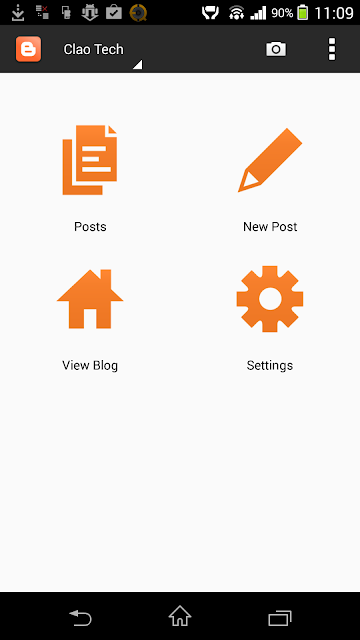
Blogger app for android


I'd like to share with you the official blogger application for android which you can use to blog on the go. It is very useful if you don't have your laptop or desktop with you when you're out of town today just like me.

I searched for this on the google play store, but unfortunately, the blogger app is not available in my country (Philippines) for reasons unknown to me YET. That's why I searched google for the apk file of this app and stumbled upon this page that provide a download link for the installation file itself. Cheers!


Well here's how the application is described:

Blogging on the go.
Download the latest release of the official Blogger app, and start blogging on the go. With Blogger for Android you can:

  • Compose a post that you can save to draft or immediately publish
  • View list of your saved and published posts
  • Switch account/blog if you have more than one
  • Embed an image from the gallery, or, by taking a picture directly from the app
  • Add labels to your posts
  • Add location information

With the Blogger app for Android, you can quickly and easily publish posts to your blog wherever you are.

Here's the download link provided by appsapk.com
http://file.appsapk.com/wp-content/uploads/downloads/Blogger.apk

Have a great day ahead of you folks and happy blogging!


Tuesday, 1 April 2014

The Walking Dead Kill Records Infographic

The walking dead logo

Hi everyone! Just had to share this info-graphic containing kill records from the main characters of the popular tv show, The Walking Dead. Fight the Dead, Fear the Living. Have fun reading it!

Four seasons of AMC's The Walking Dead has brought fifty episodes of death, carnage, and living dead mayhem. This infographic shows the firearms of the famed, highlighting specifically several of the more appreciated protagonists and their weapons of choice; included are statistics detailing the key characters and kill count with their preferred weapon and otherwise.
Some characters are more deadly than others, but whether the killer is using a samurai sword or a Glock 17 with 9mm ammo, zombie heads roll left and right. Each character's brief goes into the fine points of what kind of damage their guns, knives, and crossbows can deliver on the undead and the unfortunate living. The weapons all have their pros and cons when it comes to taking the wandering walkers down once and for all.
From http://www.9mmammo.com/

Sunday, 30 March 2014

Improve gaming performance of your computer


We all love to play video games on our personal computers. Don't you agree? But the bad thing about PC gaming is that we have to upgrade parts of our computers if we want to play the latest games with the highest quality and frame rates as possible. Unlike Xbox or PlayStation players, we can't play games that are designed to be played on higher spec machines.  It is the main problem of us, gamers specially students who don't have the budget to buy new processors, graphic cards, or even a brand new laptop!

But you don't have to buy a new gaming rig right now if you want to play resource intensive games on your old machines! I'm a low budget gamer myself and I've done my research from the past few years on how to make gaming smoother and I'll share those tweaks to you today.


Do all these and you will see a significant increase in fps (frames per second) of your games.
  • Free up space in your hard drive - This is kinda self explanatory since almost all gadgets starts to become slower as you fill the memory with files. We need at least 10% free space in a partition as a preparation for the next step. So, uninstall those applications that you rarely use or do not use at all.
  • Defrag your hard drive - Defragging the hard drive optimizes the files stored in it and removes fragmentation of files. It will make it easier and faster for the hard disk to locate the files needed to run the games. To know more about defragging and fragmentation click here.
  • Update your graphics card driver - You need to update your drivers because leading card manufacturers like nvidia and amd provides bug fixes and performance optimizations for new games.
  • Install Razer game booster - This is a free application which tweaks settings on your computer. It also works as a graphics card updater but it doesn't get the latest drivers so you have to do it manually. Its main feature is the gaming mode which temporarily disables unnecessary services and applications that may slow down gaming performance.
  • Check for viruses or spywares - You need to check for harmful softwares because these will really slow down your whole machine and might do some damage to your hardware or files.
  • Lower the video settings in the game itself - Lower the resolution, turn off or lower anti-aliasing settings, turn off v-sync, textures and other settings that have an impact on performance.
  • Disable aero or use windows classic theme if you're using windows - This will save a few ram that can be used by your games.
  • Use ReadyBoost - It is a feature present only on Windows 7 onward and can be find on My Computer. It turns your flash drive as a Virtual RAM and it is very useful if your PC doesn't have that much RAM. It is recommended for those who have lower than 4 Gigs of RAM.
  • Increase Pagefile - This step is similar to ReadyBoost but this one uses your Hard Disk as Virtual RAM instead of your Flash Drive.
  • If you're brave, Overclock your processor or graphics card - This step is risky and should only be done if you are an experienced user because you might fry your card and you will render your laptop useless if you do it wrong. If you're interested, you can search guides on google on how to overclock your specific card.

Well, that's all the tweaks that I remember. I'll keep this post updated if I find more. I hope these steps will be effective to you as it did to me. Good luck squeezing a few more power on your computers! Have fun!

Wednesday, 26 March 2014

How to reduce lag and delay in Dota 2

Dota 2 Logo claotech.blogspot.com
So you came here searching for tips on how to lower the lag and delay in Dota 2 right? You can't play like you normally would if your ping is high! You will also get frustrated since your opponents have a great advantage over you and you might also become a burden to your allies as you don't participate in team plays well.

Well here's a simple tweak to make your gameplay smoother when you have a high ping.

If you're having a large percent of packet loss and your ping is unstable (e.g. Wireless Internet Connection), I recommend should apply this setting.

Set the NETWORK QUALITY to LOW. This will make the game noticeably smoother and will make your ping stable but it rarely makes it lower. You will feel less spikes in the game.


How to reduce lag and delay in Dota 2 claotech.blogspot.com
(Click image to enlarge)


If you experience WORSE due to this setting, I suggest you revert back to HIGH settings.

That's all for today. I'll keep you posted if I get more tweaks for Dota 2!

Source(s): 
Logo – DOTA 2 [Flat]

Reduce DOTA 2 Lag – How to Play Multiplayer Matches without Delays

Monday, 24 March 2014

TeraCopy - copy files faster in windows with resume capabilities

Do you experience slow copying or moving of files in windows? Or you might have also experienced an interrupted copy process when you accidentally removed your flash drive while a large sized file is copying?

Worry no more because TeraCopy is here!

TeraCopy


Article source: http://codesector.com/teracopy


One of the most common complaints about newer versions of Windows is the slow copying speed, especially when transferring lots of files over the network. If you want to speed up your copying or if you regularly transfer large amounts of data and have to stop the process to perform some other disk-intensive task, this program may be just what you need.

TeraCopy is designed to copy and move files at the maximum possible speed. It skips bad files during the copying process, and then displays them at the end of the transfer so that you can see which ones need attention. TeraCopy can automatically check the copied files for errors by calculating their CRC checksum values. It also provides a lot more information about the files being copied than its Windows counterpart. TeraCopy integrates with Windows Explorer's right-click menu and can be set as the default copy handler.

  • Copy files fasterTeraCopy uses dynamically adjusted buffers to reduce the seek times. Asynchronous copying speeds up the file transfer between two physical hard drives.

  • Pause and resume file transfer activitiesPause the copy process at any time in order to free up system resources and continue with a single click.

  • Error recoveryIn case of a copy error, TeraCopy will try several times to recover and, in the worse case scenario, will simply skip the file, not terminating the entire transfer.
  • Interactive file listTeraCopy shows the failed file transfers and lets you fix the problem and recopy only the problem files.
  • Shell integrationTeraCopy can completely replace the Explorer copy and move functions, in turn enabling you to work with files as usual.

Full Unicode support.
Windows 8 x64 support.


Download it for free here from the author's website:

Thursday, 20 March 2014

TCP Optimizer - maximize your internet speed!

Are you tired of your slow internet? You don't get the speed promised by your ISP and you want to make it faster?


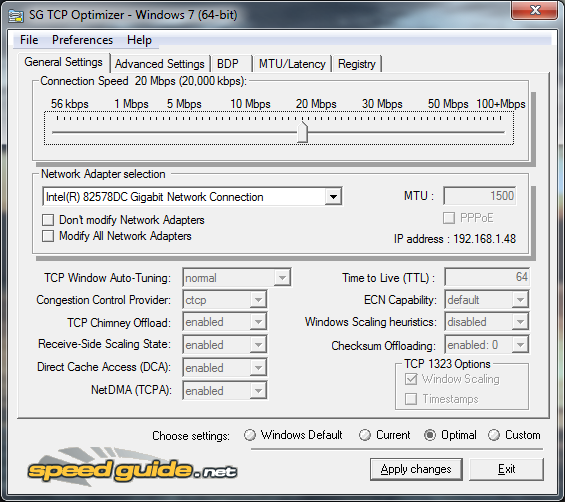
Well, you've come to the right post because here's an application by SpeedGuide that tweaks the internet settings of your computer for optimal speeds!


SG TCP Optimizer


Description from the author, SpeedGuide,


"The TCP Optimizer is a free, easy Windows program that provides an intuitive interface for tuning and optimizing your Internet connection. There is no installation required, just download and run. 

The program can aid both the novice and the advanced user in tweaking related TCP/IP parameters in Windows, making it easy to tune your system to the type of Internet connection used. The tool uses advanced algorithms, and the bandwidth*delay product to find the best TCP Window for your specific connection speed. It provides for easy tuning of all related TCP/IP parameters, such as MTU, RWIN, and even advanced ones like QoS and ToS/Diffserv prioritization. The program works with all current versions of Windows, and includes additional tools, such as testing average latency over multiple hosts, and finding the largest possible packet size (MTU). 

The TCP Optimizer is targeted towards broadband internet connections, however it can be helpful with tuning any internet connection type, from dialup to Gigabit+ :) It is completely free, requires no installation, and has been downloaded over 3 Million times. 

If you need help with the program, check the TCP Optimizer documentation, read our broadband tweaking articles, the Optimizer FAQ, and/or visit our Forums. The program can be freely (re)distributed, as long as you give us proper credit as the author, and it is not sold for profit."


Don't you worry because it will not cost you anything. It's absolutely FREE! And If you experience slower internet (which rarely happens) you can restore the settings from your backup because TCP Optimizer automatically saves one incase these kind of things happen.


You can download it from the official website of SpeedGuide.
http://www.speedguide.net/downloads.php


How to Tweak (for beginners)


This guide is just for beginners. Advanced users can experiment on their own or head to the forums of TCP Optimizer

Step 1.
Scroll the connection speed to the speed your ISP promised or the plan you applied for.

Step 2.
Click the Optimal radio button for automatic and optimal settings based on your speed.

Step 3.
Click Apply changes to save your settings.

Step 4.
Restart and see if your internet speed up a bit or if it get slower, restore to the previous or default settings.


That's all for today! Hope I helped someone!
Have a great day ahead!

Wednesday, 19 March 2014

Watch Free to Play, A Dota 2 Documentary film

Hi everyone! I just finished watching Free to Play, a documentary film featuring Hyhy (Benedict Lim), Dendi (Danil Ishutin) and Fear (Clinton Loomis) with their teams as they join the first Dota 2 International tournament. The film shows what life they have and the experiences that drive them to play Dota.

I recommend this film to everyone specially those who play Dota and other online competitive games.

Free to Play: Dota 2

image credits: (http://www.legitreviews.com/wp-content/uploads/2014/02/freetoplay_sitenewsbanner.jpg)

Synopsis from IMDB:
"Follow three professional video game players as they overcome personal adversity, family pressures, and the realities of life to compete in a $1,000,000 tournament that could change their lives forever."

You can watch the full movie for FREE on steam or here in Youtube.
Watch it here: https://www.youtube.com/watch?v=ZKti-OF0AKw


Enjoy gaming and watching! Have a nice day!

Monday, 17 March 2014

MP3Gain - Adjust and Enhance the volume of your mp3 music

Are you tired of turning up or down the volume of your music once the next song is played? You are playing a loud song when suddenly the next song will be very soft and the volume of your playing device needs to be turned up for you to hear the music.

That will be frustrating specially when you are in a hurry or walking outside and it will be a hassle to reach out to your pocket and turn up the volume of your device (assuming you're using a mobile playing device) just so you can satisfy the sound that you need.

So worry no more! MP3Gain is here!


Here's the details of the software directly from the publisher's website.


"MP3Gain analyzes and adjusts mp3 files so that they have the same volume.MP3Gain does not just do peak normalization, as many normalizers do. Instead, it does some statistical analysis to determine how loud the file actually sounds to the human ear.Also, the changes MP3Gain makes are completely lossless. There is no quality lost in the change because the program adjusts the mp3 file directly, without decoding and re-encoding."

It's absolutely FREE and you don't have to worry that your music file will get damaged or lose its quality since I have tested this with 200+ .mp3 files and I didn't have any problems with the sound!

But just for a precaution, backup your music files before you use MP3Gain so you still have the original files incase it didn't work out for you.

Here's the download link of the file.
http://mp3gain.sourceforge.net/download.php


I don't own this software nor am I affiliated with them so if you're going to give credits do it to Glen Sawyer aka "snelg".

That's all! Enjoy playing music!